

Designing for the terminal
Gemini CLI is Google’s open-source agentic command-line interface for Gemini, also embedded in Gemini Code Assist for VS Code. The canvas is a monospaced grid, the renderer is whichever terminal emulator the user happens to have installed, and every interaction is keyboard-first. I joined as a hands-on IC working on visual quality, accessibility, and the product’s written voice.
Terminal rendering and accessibility
The default themes had to render predictably across macOS Terminal.app, iTerm2, and Ghostty, each of which treats colour, block characters, and true-colour support differently. I audited the light and dark themes against typical Terminal.app backgrounds and brought both above a 4.5:1 contrast ratio.
We then split the set into “safe” themes (explicit ANSI 256 mappings, maximum compatibility) and “rich” themes (Material-inspired palettes for true-colour terminals). The CLI picks the right one based on what the emulator reports.
Smaller fixes meant going emulator by emulator. Half-line padding showed visible gaps in Apple Terminal until we detected it and swapped in block glyphs that actually align.
A small component system
Most of the interactive surface is built from a handful of reusable Ink components. I contributed several, including a shared Card with information, success, warning, error, and confirmation variants, each backed by a themed glyph that makes the tone of a message immediately legible.
Smaller fixes followed: selection-list focus highlights that span the full viewport without clipping dialog borders, and layout corrections to shared dialogs like SessionRetentionWarningDialog.
UX writing and the string-reviewer skill
The CLI’s voice matters as much as its pixels. I led a pass to standardise authentication terminology, moving from “login/logout” to “sign in / sign out” to match modern Google conventions, with backwards-compatible aliases so existing muscle memory still works.
To keep that consistency going, I authored a string-reviewer skill that ships inside the repository itself. It encodes guidance on clarity, brevity, errors, and terminology, so any contributor (human or agent) can review user-facing strings against the same standard.
## Core voice principles

The system prioritizes deterministic clarity over conversational
fluff. We provide telemetry, not etiquette, ensuring the user
retains absolute agency.
An open-source hit
Gemini CLI has been open source on GitHub from day one. In its first year, the project passed 100,000 stars, 13,000 forks, and roughly 3,000 open issues at any given moment. Every default theme, error string, and block glyph is public and reviewable.
During my time on the team, the product peaked at 1.7 million monthly active users externally, with another 18,000 Googlers using it internally. The codebase has also become a platform for other Google teams: the Android team’s new Android CLI is built on Gemini CLI, extending it with SDK management, project creation, and device deployment.
Google Cloud NEXT ‘26 keynote
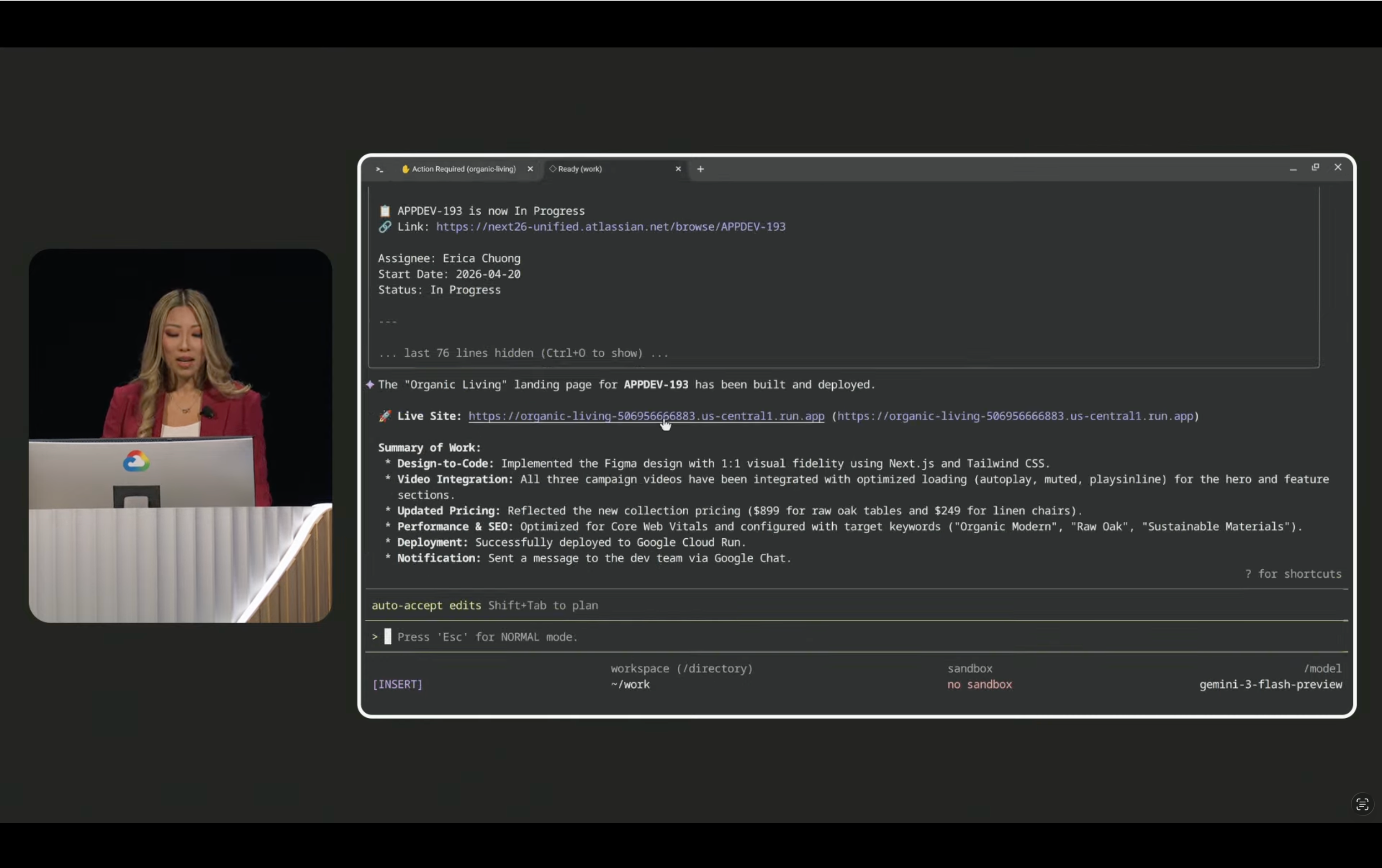
On , Gemini CLI was featured live on stage at the Google Cloud NEXT ‘26 opening keynote. The demo ran an end-to-end agentic workflow from a plain-language prompt: pulling design context from a Figma MCP server, generating design-to-code, integrating video, updating pricing, deploying to Google Cloud Run, and posting a Google Chat notification, all summarised in the terminal in a single session.